Pilot calculators · Web edition
Calculators pilots run on the ground.
Seven of them. No signup, nothing stored. The same seven calculators ship inside the iOS app — these web versions exist for the times you want a number without unlocking the phone, and as a reference surface for student pilots learning the formulas.
Need a single code rather than a calculation? The METAR and TAF glossary defines every abbreviation on one page.
The seven
Seven calculators, no signup.
01 · Flagship
METAR Decoder
Paste any raw METAR — domestic or international — and read it back in plain English. Wind, visibility, ceiling, temperature, dewpoint, altimeter, present weather. Flight category derived live.
The same parser the iOS app leads with. Useful when a controller reads a METAR on the radio and you want it spelled out before you copy it into a brief.
- In
- Raw METAR string
- Out
- Plain English + FAA category
Open the decoder
-
02
TAF Decoder
Drag a needle along the forecast window and the screen tells you, in English, what is expected at the moment you stop. Period cards labelled FM · BECMG · TEMPO · PROB30/40.
- In
- Raw TAF string
- Out
- Scrubbable timeline + readout
International TAFs (EGLL, EHAM) parsed correctly.
-
03
Density Altitude
Pressure altitude plus outside-air temperature → density altitude. The number that actually governs takeoff roll and climb performance on a hot summer day in the mountains.
- In
- Pressure altitude · OAT
- Out
- DA (ft)
Uses the standard ISA-deviation formula. Output in feet; metric on request.
-
04
Pressure Altitude
Field elevation plus current altimeter setting → pressure altitude. The input the density-altitude calculation expects, and the value performance charts are tabulated against.
- In
- Field elevation · altimeter
- Out
- PA (ft)
Standard 1,000-ft-per-inch formula referenced to 29.92 in Hg.
-
05
Wind Components
Wind direction and speed plus runway heading → headwind and crosswind components. The two numbers every preflight verdict ultimately depends on.
- In
- Wind dir/speed · runway hdg
- Out
- HW / XW (kt)
Returns gust components too when a G-value is supplied.
-
06
Unit Converter
Aviation unit conversions across the families pilots actually touch — distance, altitude, speed, temperature, pressure, weight, volume, fuel. Bidirectional.
- In
- Value · from-unit
- Out
- Converted · to-unit
Constants from the FAA Pilot/Controller Glossary and ICAO Annex 5.
-
07
Sun & Civil Twilight
For an airport on a date: sunrise, sunset, civil-twilight begin and end, both in Zulu and local. The reference the night-currency rules in 14 CFR 61.57 are tied to.
- In
- ICAO · date
- Out
- Sunrise · Sunset · Civil twilight
Same NOAA-derived algorithm the app uses.
Also in the app
The same seven, inside the app.
Every calculator on this page also lives in the SkyFeed iOS app — alongside watched stations, the pre-flight brief, the radar map, alerts, and home-screen widgets. The calculators work offline once the app is installed; the web versions need a connection but require no signup and store nothing.
On iPad, the Tools tab is a two-column grid with eight tiles — the seven listed above plus a weight-and-balance worksheet. Weight-and-balance is app-only in v1; it needs an aircraft profile to be useful.
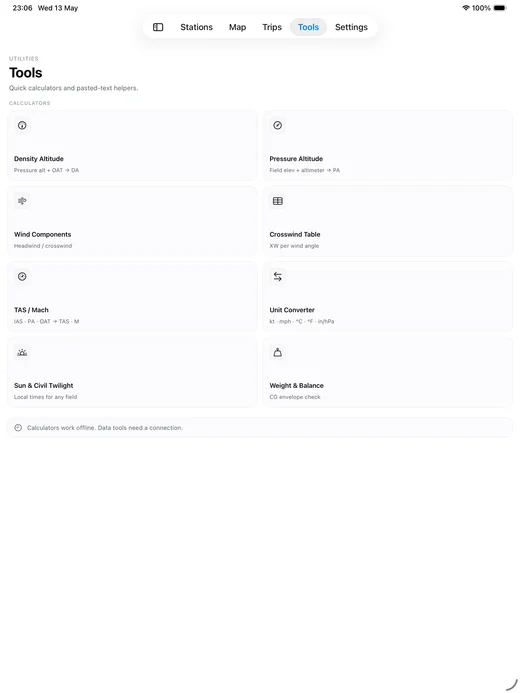
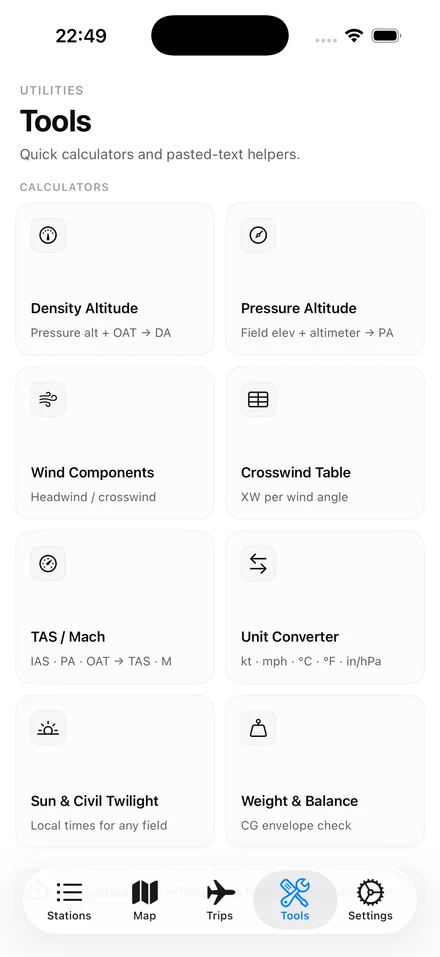
Tools tab · iPhone & iPad
Download
On the App Store.
iOS 18 and up.
iPhone and iPad. No accounts, no signup. The app is the whole product.
The newsletter
Occasional product updates and aviation-weather tips. Email only. No spam.