Skip to content
KJFK · VFR KOAK · MVFR KSFO · VFR EGLL · IFR KBOS · VFR EHAM · MVFR KSLC · VFR KPIT · LIFR KORD · MVFR KDEN · VFR LFPG · IFR KSEA · MVFR KAUS · VFR KPAO · VFR

Weather,
decoded for pilots.

METARs, TAFs, NOTAMs, and radar — read in plain English, organized around your personal minimums. iPhone and iPad, iOS 18 and up. Free.

iOS 18+ · iPhone & iPad · Free · Built by pilots

SkyFeed on iPad showing the master-detail Stations layout with KJFK selected, full decoded METAR and TAF preview, meteogram, and runway crosswind table.
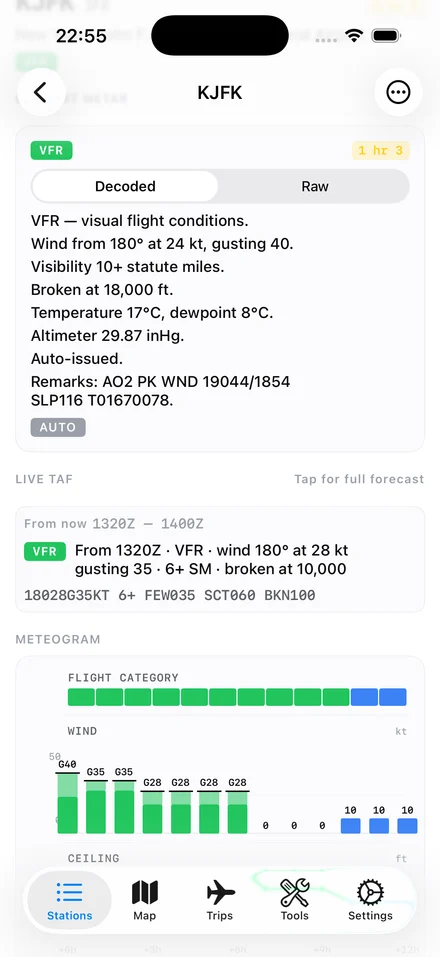
SkyFeed Station Detail for KJFK on iPhone — VFR category pill, decoded METAR at the top, Live TAF preview, twelve-hour meteogram.

Decoded, before the raw

Decoded, before the raw.

The decoded sentence is the headline; the raw METAR or TAF is a footnote. No toggle, no settings panel, no "advanced mode" — that's the whole product. Tap the raw line if you want to see what the sentence was derived from.

KSFO · San Francisco Intl · 18:56Z checked

Wind 280° at 9 kt. Visibility 10 SM. Few clouds at 1,500 ft; scattered above 20,000. Eighteen Celsius. Altimeter 30.01.


METAR KSFO 121856Z 28009KT 10SM FEW015 SCT200 18/12 A3001

What it does

Four products, one screen.

  • 01 · Current observations

    METARs, in plain English

    Every observation decoded by default. Wind, visibility, ceiling, staleness — surfaced where they need to be. Raw text on tap, never buried more than that.
  • 02 · Forecasts

    TAFs on a scrubbable timeline

    Drag a needle along the forecast window. The screen tells you, in English, what is expected at the moment you stop. International TAFs supported.

  • 03 · Notices

    NOTAMs by impact

    FAA NOTAMs filtered to your watched stations and ordered by how much they actually matter. The runway closure surfaces; the obstruction lights across the bay do not.

  • 04 · Map

    Radar, SIGMETs, PIREPs

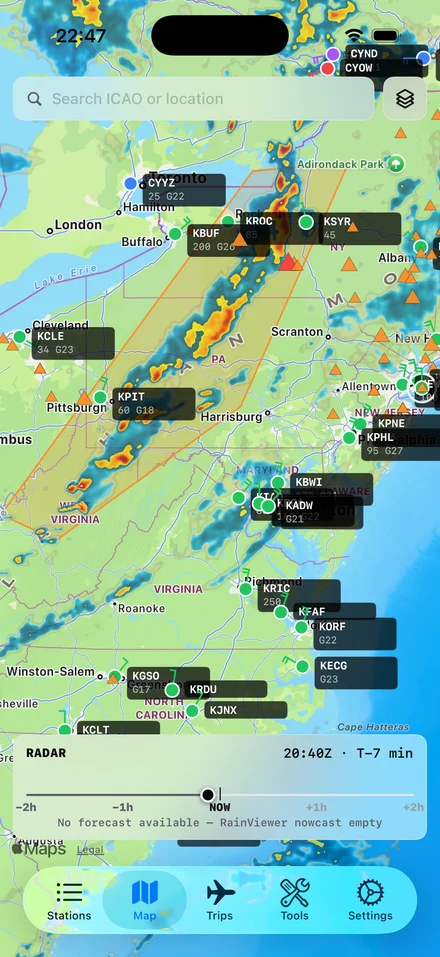
    NEXRAD in the US and RainViewer worldwide, with a time scrubber. Watched-station markers carry their current FAA category. PIREPs within 50 NM, last two hours.

Flight categories

  • VFR Ceil > 3,000 · Vis > 5
  • MVFR 1,000–3,000 · 3–5
  • IFR 500–1,000 · 1–3
  • LIFR < 500 · < 1

Three principles

01

Decoded by default.

Every weather product shown in plain English first. Raw text on tap. Stationweather buries decoding behind a toggle; SkyFeed leads with it.

02

Personal minimums everywhere.

Your limits are the first-class organizing principle for every screen — verdicts, color tints, alerts, brief checks. Nobody else does this end-to-end.

03

iPad-class on iPad.

Real master-detail and multi-column layouts. Pilots flying with iPads on kneeboards get a proper EFB-style sidebar, not a stretched phone view.

In the cockpit, before the flight

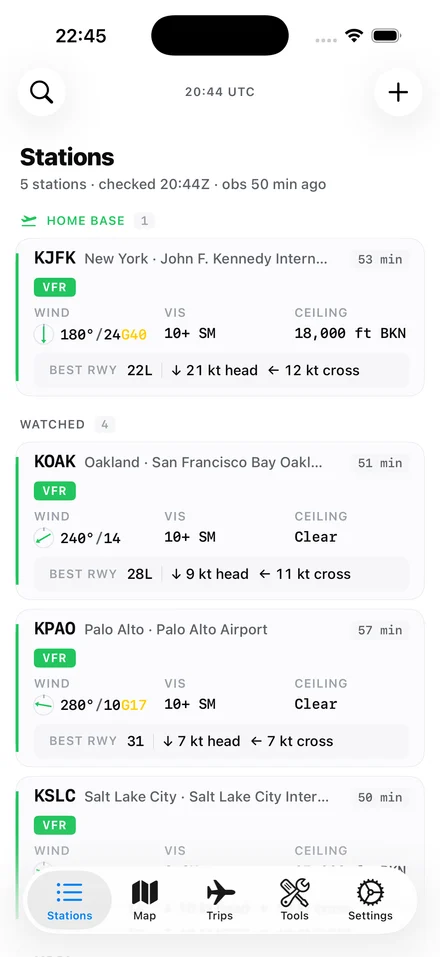
SkyFeed Stations Home screen — five watched airports including KJFK, KOAK, KPAO, and KSLC, each with FAA category pills, wind, visibility, ceiling, and best-runway recommendations.
01 / Stations Home

Watched airports grouped by trip and home base.

SkyFeed Station Detail for KJFK — VFR pill, decoded METAR at the top, Live TAF preview below, and a twelve-hour meteogram of flight category, wind, and ceiling.
02 / Station Detail

METAR, TAF, runways, NOTAMs, frequencies — one screen.

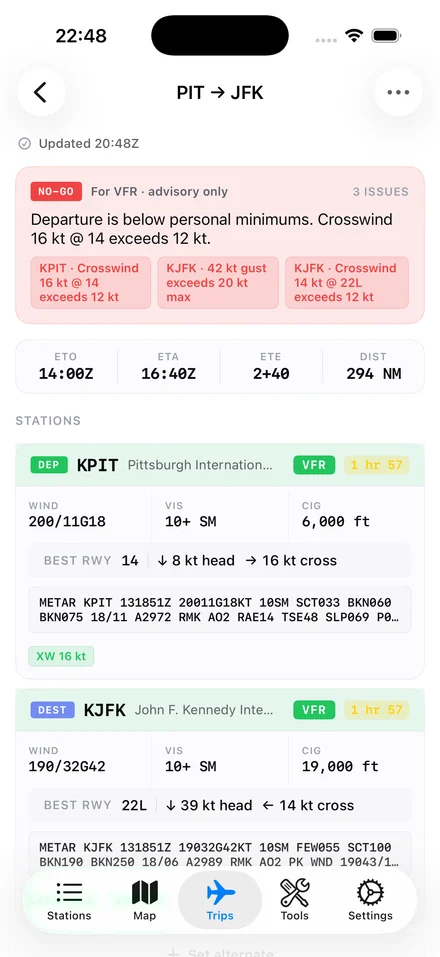
SkyFeed Brief screen for KPIT → KJFK — a red NO-GO advisory at the top, then both stations listed with full METARs and best-runway notes.
03 / Pre-flight Brief

Departure, destination, alternate. Personal-minimums verdict at the top.


Common questions

Eight things people tend to ask before downloading. If something else is unclear, the answer is probably in Features.

Q.01 What is SkyFeed?

SkyFeed is an iOS aviation weather app for general aviation pilots. It shows METARs, TAFs, NOTAMs, and radar — decoded into plain English by default and organized around your personal minimums. iPhone and iPad, iOS 18 and up.

Q.02 Who is it for?

Private and IFR-rated pilots flying piston singles or twins, typically 100–500 hours. Student pilots in particular benefit from the plain-English decoding. It is not built for Part 121/135 commercial operations, drone work, or non-pilot enthusiasts.

Q.03 How is it different from Stationweather or ForeFlight?

Stationweather buries decoded weather behind a toggle; SkyFeed leads with the decoded sentence and tucks the raw text underneath. ForeFlight is a full EFB with charts, plates, and flight planning; SkyFeed is just the weather and brief tools. They solve different problems.

Q.04 Does it work offline?

Yes. Watched stations and last-known data are cached. If you lose signal in the cockpit, you keep seeing the last METAR and TAF you had, with a clear staleness indicator. The app never errors out due to no signal.

Q.05 What weather sources does it use?

METARs and TAFs from NOAA Aviation Weather Center. NOTAMs from the FAA NOTAM API. Radar from NOAA NEXRAD (US) and RainViewer (worldwide). Sun and twilight from the NOAA algorithm. Airport catalog from OurAirports.

Q.06 Does it work outside the United States?

Mostly. METARs and TAFs work worldwide via NOAA's Aviation Weather Center. Radar is NEXRAD in the US and RainViewer everywhere else. NOTAMs are US-only in v1. International TAFs (EGLL, EHAM, and similar) are parsed correctly.

Q.07 Is it free?

Yes, on the App Store. No Pro tier, no subscription, no ads in v1. If pricing ever changes, it will be announced clearly first.

Q.08 Will there be an Android version?

Not in v1. iOS-only is a deliberate choice — going deep on iPad master-detail and multi-column layouts is the differentiator. Android is possible later but is not on the v1 roadmap.

Download

Free on the App Store. iOS 18 and up.

iPhone and iPad. No accounts, no signup, no Pro tier. The app is the whole product.

The newsletter

Occasional product updates and aviation-weather tips. Email only. No spam.

Unsubscribe in one click. No third parties.